No generation starts on upload or login. Confirmed failed jobs return reserved credits.
Preview & results
Make room for your next image
Choose a source or describe a new image. The result appears here.
Review faces, hands, garment details and exact spelling before publishing AI-edited images.
See a real result
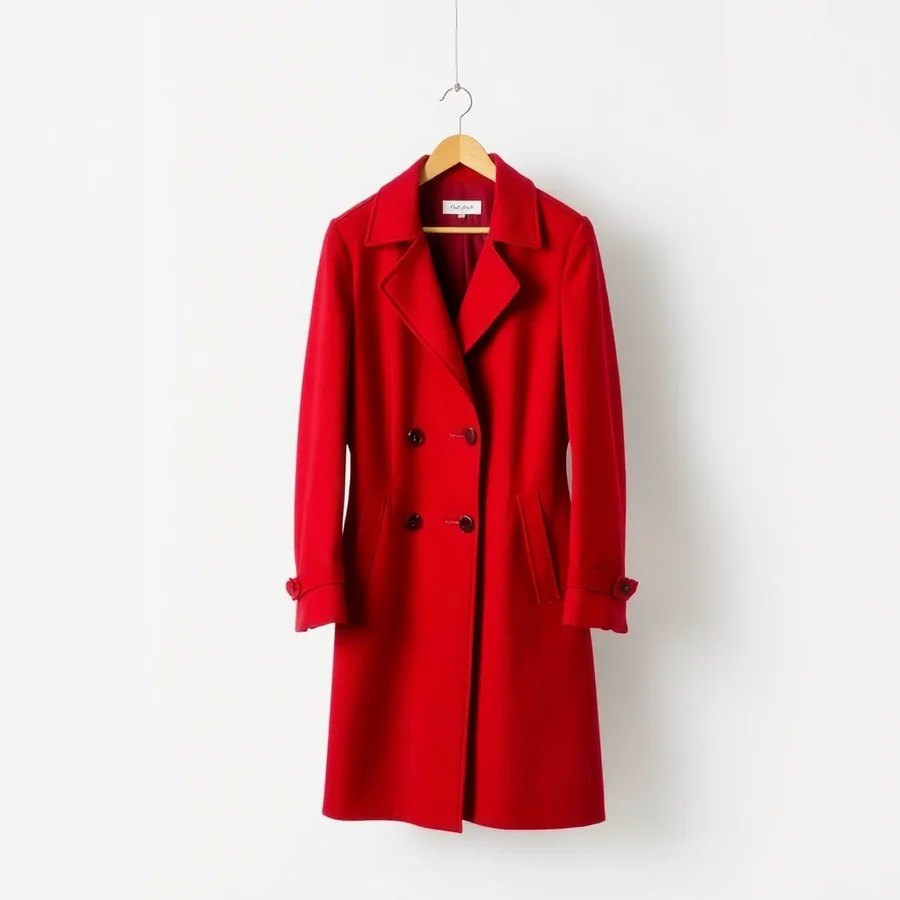
The red coat reference replaces the original outerwear. This is a visual styling preview; it does not measure physical fit.
SourceReferenceAI result
One illustrative sample from ShotTide. Results vary with the source and instructions.
What is virtual try-on?
AI virtual try-on creates a picture of a person wearing clothing from a separate image. It is a visual styling preview, not a measurement of physical fit or a guarantee of garment appearance. Start with a clear person photo and a clean garment reference, then inspect the pattern, seams, logos and drape in the result.
Separate the person from the garment
The first upload is the person; the second is the clothing. A flat-lay or unobstructed product photo can make the garment easier to describe. Avoid references where hands or accessories obscure important construction details.
Guide the styling
Use additional direction for layering, tucked or untucked styling, and which garment to replace. The model may reinterpret fabric and logos, so review the preview before using it in a product listing.
Compare without claiming fit
Check sleeves, hems, fastenings, fingers and body proportions against the source. Real fit depends on measurements and fabric behavior that a single photo does not establish.
How to use virtual try-on
Choose the person
Upload a photo you have permission to edit.
Add the garment
Upload the clothing image and describe any styling preference.
Inspect the outfit
Compare the generated garment with the product reference and download the preview.
A direction to start from
An editable prompt example. Adapt the subject and setting to your own source.
Dress the person in the reference garment. Keep their face, body proportions, pose and background. Preserve the garment color, cut and fabric texture with natural folds.
Virtual Try-On: questions answered
Does virtual try-on tell me my size?
No. It generates a visual preview, not a size recommendation or a measurement-based fitting simulation. Consult the garment’s sizing and measurements separately.
Can it preserve prints and logos?
The prompt asks the model to retain them, but small text, repeated patterns and logos may change. Check these details before publishing a result.
Can I try on several items at once?
This editor takes one garment reference per generation. Keep each request focused on a clear outfit change; a reference containing multiple items may be interpreted inconsistently.
How much does it cost?
One result costs 2 credits. A confirmed failed or canceled task returns its reserved credits. A new version is a separate generation.